Building a Smart YouTube Automation Agent with n8n and Gemini
I spent the entire day building a comprehensive YouTube automation workflow in n8n from scratch. It was one of those days where “just connecting an API” turns into a deep dive into OAuth scopes and raw HTTP requests.
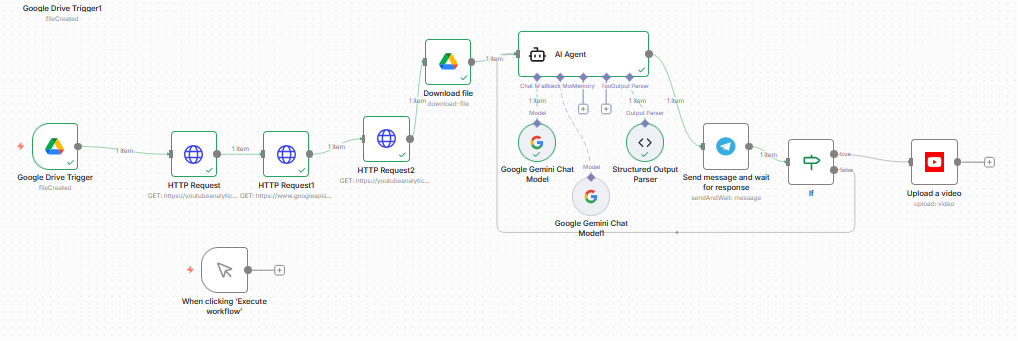
The Cloud Credentials Maze
Despite being very familiar with Google Cloud—hosting multiple projects, instances, and even my self-hosted n8n instance there—setting up the credentials for this was still a mess.
It wasn’t just about getting a Client ID and Secret. It was about configuring the consent screen, ensuring the right scopes were enabled for both the YouTube Data API and the Analytics API, and tweaking the redirect URIs until the handshake finally worked. If you think experienced devs don’t struggle with IAM and OAuth every time, you’re wrong.
The Limitation: n8n Native Nodes
My initial plan was simple: use the built-in n8n YouTube nodes. I quickly hit a wall.
The native nodes are great for basic tasks like “Upload Video” or “Get Channel Statistics,” but they hide the granular data. I needed deep analytics—specifically watch time and average view duration. These are the metrics that actually drive channel growth, not just raw view counts.
The Solution? I had to abandon the comfort of the pre-built nodes and build my own API calls using HTTP Request nodes. This gave me direct access to the youtubeAnalytics endpoint, allowing me to fetch the specific reports I needed.
The AI Brain: Gemini 3 Pro
The workflow doesn’t just “post and forget.” It acts as an intelligent agent.
- Trigger: It watches a specific Google Drive folder for a ready-to-upload video file.
- Analysis: It scrapes my channel’s recent performance data using those custom HTTP requests.
- Decision: Instead of just posting at a “standard” time or targeting a high-traffic region, I feed this data into Gemini 3 Pro.
The AI analyzes the watch time and retention trends to determine the absolute best upload slot. It also strictly enforces a “Max 1 Post Per Day” policy to keep the algorithm happy, checking my recent schedule to ensure we don’t spam the channel.
It was a long process of trial and error, but the result is a workflow that doesn’t just automate the action of uploading, but automates the intelligence behind the scheduling.