Docker Foundations: From Containers to Kubernetes
I’ve recently completed the Docker Foundations Professional Certificate, and it has completely changed how I approach software development and deployment. In this post, I want to share what I’ve learned—from the basics of containers to the complexity of Kubernetes—and show you how I’m already applying these concepts in my real-world projects.
The Docker Workflow
Before diving into the code, it’s essential to understand the core workflow. Docker isn’t just about “running containers”; it’s a pipeline for building consistent environments.
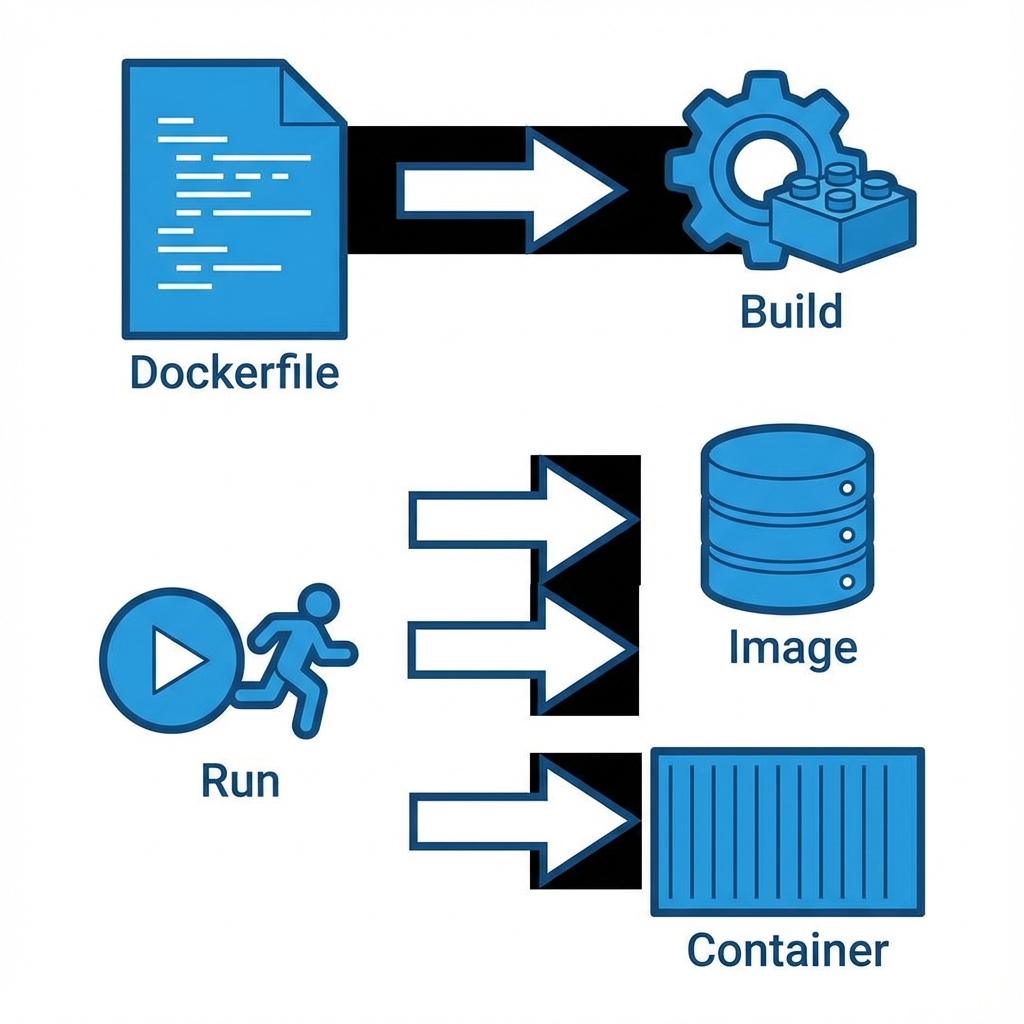
1. The Dockerfile
Everything starts with a Dockerfile. This is the blueprint. In my learning repository, docker-your-first-project-4485003, I learned that a Dockerfile is essentially a script of instructions.
# Example from my learning path
FROM node:14-alpine
WORKDIR /app
COPY package*.json ./
RUN npm install
COPY . .
EXPOSE 3000
CMD ["npm", "start"]
2. Building the Image
The docker build command takes that blueprint and creates an Image. An image is a read-only template. It includes your code, libraries, dependencies, and tools. It’s immutable—once built, it doesn’t change.
3. Running the Container
When you run an image, it becomes a Container. This is the live, running instance. You can have multiple containers running from the same image, completely isolated from each other.
Advanced Management
Learning the basics was just the start. The certificate also covered how to manage these containers efficiently in a production-like environment.
Data Persistence with Volumes
One of the first “gotchas” with Docker is that data inside a container is ephemeral. If the container dies, the data dies. I learned to use Volumes to persist data.
docker run -v my_volume:/var/lib/mysql mysqlThis maps a storage area on my host machine to the container, ensuring my database doesn’t get wiped out on a restart.
Efficient Runtime & Pruning
Over time, building images leaves behind “dangling” layers and stopped containers. I learned the importance of keeping the environment clean to save disk space:
# The magic command to clean up unused objects
docker system prune
Orchestration: Compose & Kubernetes
Running one container is easy. Running a web server, a database, and a cache all together? That’s where Docker Compose comes in.
In my projects, I use docker-compose.yml to define multi-container applications. It allows me to spin up my entire stack with a single command: docker-compose up.
Scaling with Kubernetes
But what happens when you need to scale across multiple servers? That’s where Kubernetes (K8s) enters the picture.
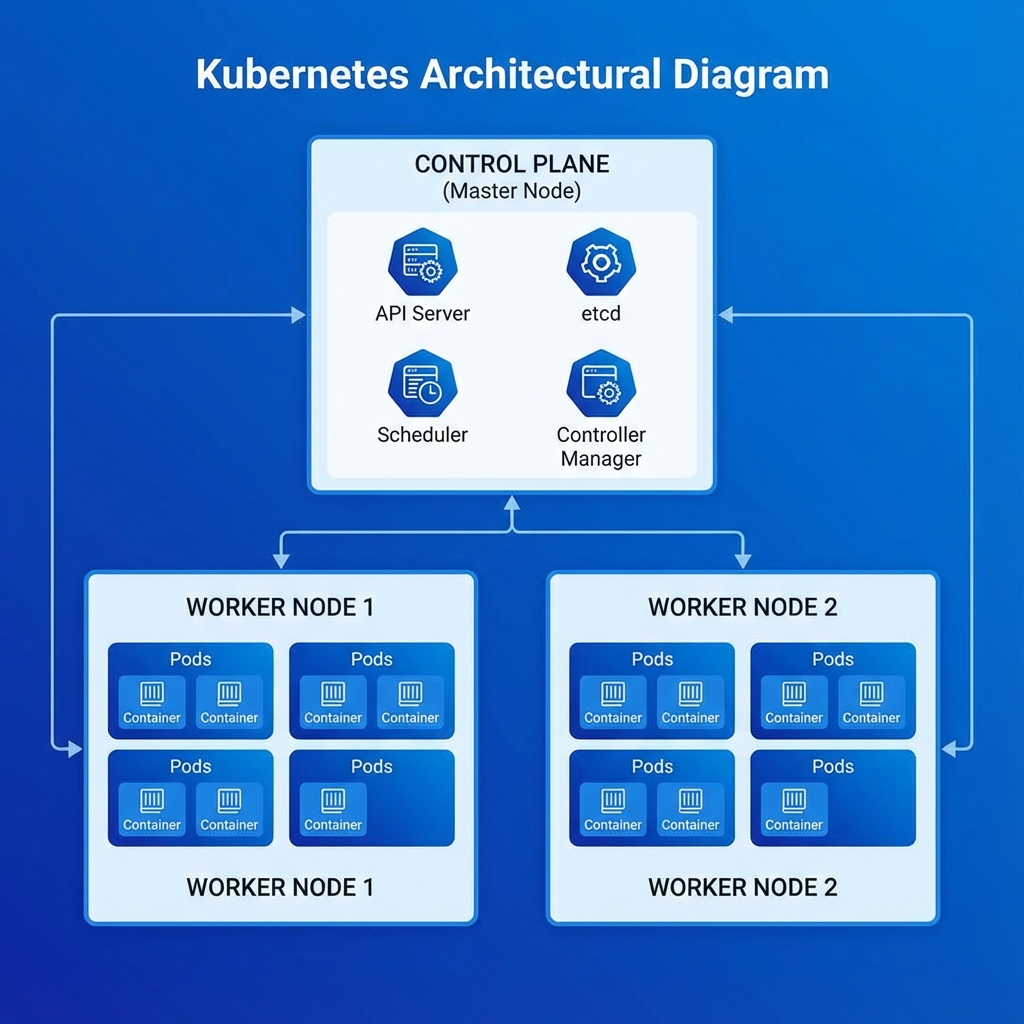
Kubernetes takes container management to the next level. It uses a Control Plane to manage Worker Nodes, which in turn run Pods (groups of containers). It handles:
- Auto-scaling: Adding more pods when traffic spikes.
- Self-healing: Restarting failed containers automatically.
- Load balancing: Distributing traffic across pods.
Real-World Application: Kaelux-Automate
I’m not just learning this in theory; I’m using it. In my project, Kaelux-Automate, Docker is critical.
Why Docker for Automation?
This project involves complex workflows with n8n, which connects to various services including Pinecone (a Vector Database) for AI memory.
- Consistency: I can run the exact same n8n version on my laptop and my server. No “it works on my machine” bugs.
- Isolation: The AI components and the workflow engine run in separate containers, ensuring that a heavy process in one doesn’t crash the other.
- Vector DB Integration: Connecting to Pinecone requires secure environment variable management, which Docker handles gracefully through
.envfiles passed at runtime.
Orchestration with ModelForge
Another project where I rely heavily on Docker is ModelForge, my AI-powered Blender assistant.
Here, I use Docker Compose to orchestrate multiple services:
- The main Electron application.
- A local database (PostgreSQL) for asset management.
- The AI orchestration layer.
Using Compose allows me to define the entire stack in a single docker-compose.yml file, making it incredibly easy for other developers to spin up the project with a single command: docker-compose up.
Conclusion
Docker has become a foundational tool in my developer toolkit. Whether I’m spinning up a quick test environment for a new library or deploying a complex AI automation system, the ability to containerize applications ensures they run reliably, everywhere.